

Client staffing · Internal project workforce · ERP connected placements
Your people. Your projects. Every approved hour connected.
Connect client staffing requests and project workforce demand with the placements, approved hours and billing behind them. Spell Workforce Delivery links Spell CRM Pro and Construction Pro with Spell ERP, so commercial, operations, HR and finance teams work from one connected record.
- Client staffing
- Internal project workforce
- ERP connected placements
The problem
Staffing requests, placements and billing, kept in three different places.
Workforce demand arrives by email and phone. Placements live in a spreadsheet. Approved hours sit with the site supervisor, and billing waits for someone to reconcile all three.
Spell Workforce Delivery keeps client relationships, project demand and workforce delivery connected, without copying sensitive HR records into the sales workspace.
What changes
One workflow from requirement to billing.
Give operations, HR and finance a shared view of who is assigned, where they are working, what has been approved and which hours are ready to bill.
Clearer deployment visibility
See who is assigned, to which client and project, in what role, and where each placement stands, in the context of the customer and the project.
Controlled hour approvals
Regular and overtime hours move through defined review stages, from draft and submitted through client and internal approval to invoiced.
Connected workforce billing
In Spell ERP, turn approved hours into reviewable customer invoices with a clear link back to the work they came from.
The journey
From requirement to placement to approved billing.
Connected records at every step.
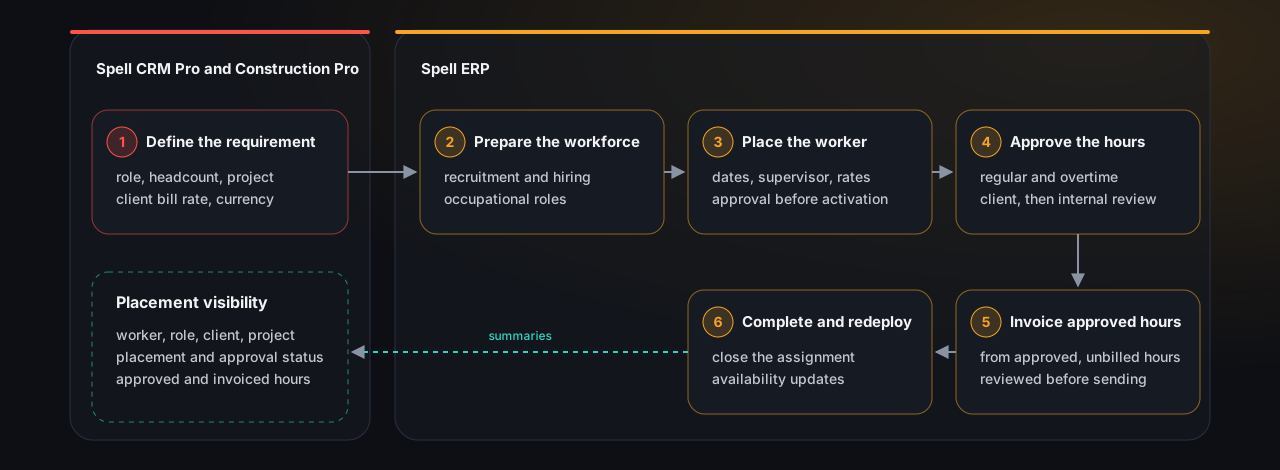
Define the requirement
Identify the client or internal project, the roles and the headcount needed, through the connected Spell CRM Pro workflow.
Prepare the workforce
Recruitment and HR processes in Spell ERP establish worker records and the right occupational roles.
Place the worker
Create the project assignment, set the dates and rates, and record the approval status before it goes active.
Record and approve hours
Capture regular and overtime work, then complete the recorded client and internal review stages.
Create the customer invoice
Choose the project and billing period, generate a draft invoice from approved, unbilled hours, and review it before sending.
Complete and redeploy
Close the assignment when the work finishes and review availability for the next placement. Payroll is prepared separately.
How it connects
Where each step happens.
The requirement starts in Spell CRM Pro and Construction Pro. Recruitment, placement, hours, invoicing and redeployment run in Spell ERP. Placement summaries return to the CRM workspace.
Capabilities
What each part of the workflow does.
Structured workforce requirements
Record the role and trade, headcount, work location, worker categories, client bill rate and currency against the client account and its Construction Pro project, in one structured request.
Two delivery models
Supply workers to clients, deploy your own people to your own projects, or run both. Workforce provider, direct employer and hybrid operating models are supported.
Consistent roles and categories
A shared role catalogue maintained in Spell ERP, with optional Arabic names, replaces inconsistent job titles. Workforce roles stay separate from system permissions.
Placements and availability
Assign workers to projects with engagement type, dates, supervisor and rates. Placements move from proposed through active to completed, and availability updates as work finishes.
Hours and approval stages
Record work dates with regular and overtime hours, including fractional hours. Authorized staff record client and internal approval, with rejection available during review.
Pay and bill rates by placement
Keep worker pay rates and customer bill rates organized by placement, with regular and overtime rates and currency kept with the assignment.
Connected products
Each product does the part it is built for.
Available with the relevant Spell modules and a configured integration.
Spell Workforce Delivery
Structured staffing requirements, role and category coordination, placement visibility and integration status.
Trust
Operational context shared. Protected records kept where they belong.
Teams get the context they need to deliver the work, while protected HR and payroll information stays in Spell ERP.
Passports, national IDs, medical information, bank details and protected documents are excluded from the operational CRM view by default
Field sensitivity, sharing scope and direction controls decide what each system receives
Management views require manager level access and are scoped to your organization
Synchronization timestamps and failures are visible, with retry actions for administrators
Event identity and version checks guard supported exchanges against duplicate delivery and stale updates
Who it serves
Built for organizations that deliver work through people.
Workforce providers
Supply workers to builders, contractors and client projects while keeping demand linked to the commercial relationship.
Builders and contractors
Request and monitor workers for your own construction projects.
Hybrid organizations
Run client staffing and internal project workforce delivery side by side.
Operations and account managers
Review requirements, placements and delivery updates without needing unrestricted access to HR or payroll records.
Questions
Frequently asked.
Is Workforce Delivery only for construction companies?
Construction is the connected use case today, through Spell Construction Pro projects. The underlying workflow suits project based workforce delivery more broadly, and the right fit for your organization is confirmed during discovery.
Can we manage workers supplied to clients and workers for our own projects?
Yes. It supports client staffing and internal project workforce, with provider, direct employer and hybrid operating models.
Can approved hours become a customer invoice?
Yes, in Spell ERP. Authorized staff create a draft invoice from approved, unbilled hours for a customer linked project, then review and send it through the ERP invoicing workflow.
Does it run payroll automatically from these timesheets?
Not currently. Spell ERP supports hourly and salaried payroll, and approved earnings and hours are entered into the draft payroll by authorized payroll staff.
Does it connect to Spell CRM Pro and Spell ERP?
Yes, through the configured integration. Requirements flow to Spell ERP for recruitment and placement, and operational placement summaries return to the CRM workspace. Module availability and tenant setup are confirmed during implementation.
Is there a separate Workforce Delivery mobile app?
No. Workforce Delivery is a web workspace. Related field activity may be supported through the Spell CRM Pro mobile companion, depending on licensed features and user permissions.
Book a Workforce Delivery demo
Tell us how you deliver work today: whether you supply workers to clients, deploy your own teams, or both. We will show you the connected workflow on the Spell products you run, and confirm the modules and integration you would need.